This feed contains some of my blog entries that link to software code that I've developed.
I recently learned about the Zephyr Project which is a rather neat embedded OS for devices too small to run Linux.
This led me to wondering if I could adapt arduino-copilot to target Zephyr, and so be able to program any of the 350+ boards it supports using Haskell.
At the same time I had an opportunity to give a talk at the Houston Functional Programmers group. On February 1st I decided to give that talk, about arduino-copilot.
That left 2 weeks to buy some hardware supported by Zephyr and port arduino-copilot to it. The result is zephyr-copilot, and I was able to demo it during my talk.
This example can be used with any of 293 different boards, and will blink an on-board LED:
module Examples.Blink.Demo where

import Copilot.Zephyr.Board.Generic

main :: IO ()
main = zephyr $ do
        led0 =: blinking
        delay =: MilliSeconds (constant 100)
Doing much more than that needs a board specific module to set up GPIO pins etc. So far I only have written those for a couple of boards I have, but they are fairly easy to write. I'd be happy to help anyone who wants to contribute one.
Due to the time constraints I have not implemented serial port support, or PWM or ADC yet, although all should be fairly easy. Zephyr also has no end of other capabilities, from networking to file systems to sensors, that could perhaps be supported in zephyr-copilot.
My talk has now been published on youtube. I really enjoyed presenting again for the first time in 4 years(!), and to a very nice group of people. Thanks to Claude Rubinson for his persistence in getting me to give a talk.
Development of zephyr-copilot was sponsored by Mark Reidenbach, Erik Bjäreholt, Jake Vosloo, and Graham Spencer on Patreon.
Happy solstice, and happy Volunteer Responsibility Amnesty Day!
After my inventory of my code today, I have decided it's time to pass on moreutils to someone new.
This project remains interesting to people, including me. People still send patches, which are easy to deal with. Taking up basic maintenance of this package will be easy for you, if you feel like stepping forward.
People still contribute ideas and code for new tools to add to moreutils. But I have not added any new tools to it since 2016. There is a big collections of ideas that I have done nothing with. The problem, I realized, is that "general-purpose new unix tool" is rather open-ended, and kind of problimatic. Picking new tools to add is an editorial process, or it becomes a mishmash of too many tools that are perhaps not general purpose. I am not a great editor, and so I tightened my requirements for "general-purpose" and "new" so far that I stopped adding anything.
If you have ideas to solve that, or fearless good taste in curating a collection, this project is for you.
The other reason it's less appealing to me is that unix tools as a whole are less appealing to me now. Now, as a functional programmer, I can get excited about actual general-purpose functional tools. And these are well curated and collected and can be shown to fit because the math says they do. Even a tiny Haskell function like this is really very interesting in how something so maximally trivial is actually usable in so many contexts.
id :: a -> a
id x = x
Anyway, I am not dropping maintenance of moreutils unless and until someone steps up to take it on. As I said, it's easy. But I am laying down the burden of editorial responsibility and won't be thinking about adding new tools to it.
Thanks very much to Sumana Harihareswara for developing and promoting the amnesty day idea!
I am no longer maintaining github-backup. I'll contine hosting its website and git repo for the time being, but it needs a new maintainer if it's going to survive.
I don't really think it needs to survive. If the farce of youtube-dl being removed from github, thus losing access to all its issues and pull requests, taught us anything, it's that having that happen does not make many people reconsider their dependence on github. (Not even youtube-dl it turns out, which is back on there.) Clearly people don't generally have any interest in backing that stuff up.
As far as the git repositories on Github, they are getting archived very effectively by softwareheritage.org which vaccumes up all git repositories from Github. Which points to a problem, because the same can't be said for git repositories not hosted on Github. There's a form to submit them but the submissions often get hung up needing manual review, and it doesn't seem to pull in new commits actively if at all, based on the few git repositories I've had archived there so far.
That seems like something it might be worth building some software to manage. But it's also just another case of Github's mass bending reality around it; the average Github user doesn't care about this and still gets archived; the average self-hosting git user may care about this slightly more, but most won't get archived, even if that software did get built.
I am trying to avoid bringing coronovirus into my house on anything, and I also don't want to sterilize a lot of stuff. (Tedious and easy to make a mistake.) Currently it seems that the best approach is to leave stuff to sit undisturbed someplace safe for long enough for the virus to degrade away.
Following that policy, I've quickly ended up with a porch full of stuff in different stages of quarantine, and I am quickly losing track of how long things have been in quarantine. If you have the same problem, here is a solution:
Open it on your mobile device, and you can take photos of each thing, select the kind of surfaces it has, and it will track the quarantine time for you. You can share the link to other devices or other people to collaborate.
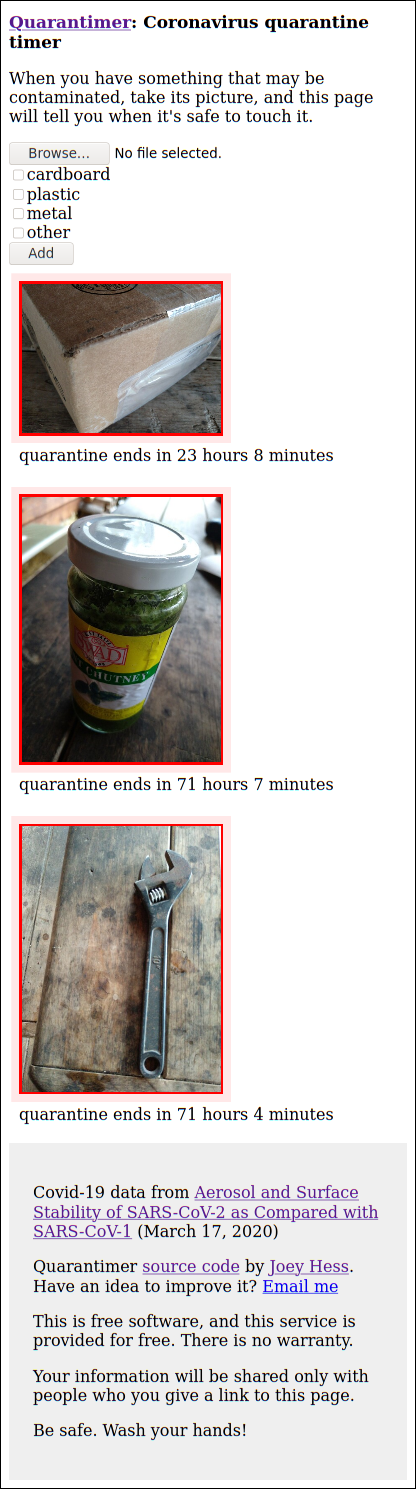
I anticipate the javascript and css will improve, but it's good enough for now. I will provide this website until the crisis is over. Of course, it's free software and you can also host your own.
If this seems useful, please tell your friends and family about it.
Be well!
This is made possible by my supporters on Patreon, particularly Jake Vosloo.
My framework for programming Arduinos in Haskell has two major improvements this week. It's feeling like I'm laying the keystone on this project. It's all about the combinators now.
Sketch combinators
Consider this arduino-copilot program, that does something unless a pause button is pushed:
paused <- input pin3
pin4 =: foo @: not paused
v <- input a1
pin5 =: bar v @: sometimes && not paused
The pause button has to be checked everywhere, and there's a risk of forgetting to check it, resulting in unexpected behavior. It would be nice to be able to factor that out somehow. Also, notice that it inputs from a1 all the time, but won't use that input when pause is pushed. It would be nice to be able to avoid that unnecessary work.
The new whenB combinator solves all of that:
paused <- input pin3
whenB (not paused) $ do
    pin4 =: foo
    v <- input a1
    pin5 =: bar v @: sometimes
All whenB does is takes a Behavior Bool and uses it to control
whether a Sketch runs. It was not easy to implement, given
the constraints of Copilot DSL, but it's working. And once I had
whenB, I was able to leverage RebindableSyntax to allow
if then else expressions to choose between Sketches, as well as between
Streams.
Now it's easy to start by writing a Sketch that describes a simple behavior,
like turnRight or goForward, and glue those together in a straightforward
way to make a more complex Sketch, like a line-following robot:
ll <- leftLineSensed
rl <- rightLineSensed
if ll && rl
    then stop
    else if ll
        then turnLeft
        else if rl
            then turnRight
            else goForward
(Full line following robot example here)
TypedBehavior combinators
I've complained before that the Copilot DSL limits Stream to basic C data
types, and so progamming with it felt like I was not able to leverage
the type checker as much as I'd hope to when writing Haskell, to eg
keep different units of measurement separated.
Well, I found a way around that problem. All it needed was phantom types, and some combinators to lift Copilot DSL expressions.
For example, a Sketch that controls a hot water heater certainly wants to indicate clearly that temperatures are in C not F, and PSI is another important unit. So define some empty types for those units:
data PSI
data Celsius
Using those as the phantom type parameters for TypedBehavior, some important values can be defined:
maxSafePSI :: TypedBehavior PSI Float
maxSafePSI = TypedBehavior (constant 45)

maxWaterTemp :: TypedBehavior Celsius Float
maxWaterTemp = TypedBehavior (constant 35)
And functions like this to convert raw ADC readings into our units:
adcToCelsius :: Behavior Float -> TypedBehavior Celsius Float
adcToCelsius v = TypedBehavior $ v * (constant 200 / constant 1024)
And then we can make functions that take these TypedBehaviors and run Copilot DSL expressions on the Stream contained within them, producing Behaviors suitable for being connected up to pins:
isSafePSI :: TypedBehavior PSI Float -> Behavior Bool
isSafePSI p = liftB2 (<) p maxSafePSI

isSafeTemp :: TypedBehavior Celsius Float -> Behavior Bool
isSafeTemp t = liftB2 (<) t maxSafePSI
(Full water heater example here)
BTW, did you notice the mistake on the last line of code above? No worries; the type checker will, so it will blow up at compile time, and not at runtime.
    • Couldn't match type ‘PSI’ with ‘Celsius’
      Expected type: TypedBehavior Celsius Float
        Actual type: TypedBehavior PSI Float
The liftB2 combinator was all I needed to add to support that.
There's also a liftB, and there could be liftB3 etc. (Could it
be generalized to a single lift function that supports multiple arities?
I don't know yet.) It would be good to have more types than just phantom
types; I particularly miss Maybe; but this does go a long way.
So you can have a good amount of type safety while using Copilot to program your Arduino, and you can mix both FRP style and imperative style as you like. Enjoy!
This work was sponsored by Trenton Cronholm and Jake Vosloo on Patreon.
My framework for programming Arduinos in Haskell in FRP-style is a week old, and it's grown up a lot.
It can do much more than flash a light now. The =: operator can now connect
all kinds of FRP Events to all kinds of outputs. There's some type level
progamming going on to only allow connections that make sense. For example,
arduino-copilot knows what pins of an Adruino support DigitalIO and
which support PWM. There are even nice custom type error messages:
demo.hs:7:9: error:
    • This Pin does not support digital IO
    • In a stmt of a 'do' block: a6 =: blinking
I wanted it to be easy to add support to arduino-copilot for using Arduino C libraries from Haskell, and that's proven to be the case. I added serial support last weekend, which is probably one of the harder libraries. It all fell into place once I realized it should not be about individual printfs, but about a single FRP behavior that describes all output to the serial port. This interface was the result:
n <- input a1 :: Sketch (Behavior ADC)
Serial.device =: [Serial.str "a1:", Serial.show n, Serial.char '\n']
Serial.baud 9600
This weekend I've been adding support for the EEPROMex library, and the Functional Reactive Programming approach really shines in stuff like this example, which gathers data from a sensor, logs it to the serial port, and also stores every 3rd value into the EEPROM for later retrival, using the whole EEPROM as a rolling buffer.
v <- input a1 ([10, 20..] :: [ADC])
range <- EEPROM.allocRange sizeOfEEPROM :: Sketch (EEPROM.Range ADC)
range =: EEPROM.sweepRange 0 v @: frequency 3
led =: frequency 3
Serial.device =: [ Serial.show v, Serial.char '\n']
Serial.baud 9600
delay =: MilliSeconds (constant 10000)
There's a fair bit of abstraction in that... Try doing that in 7 lines of C code with that level of readability. (It compiles into 120 lines of C.)
Copilot's ability to interpret the program and show what it would do, without running it on the Adruino, seems more valuable the more complicated the programs become. Here's the interpretation of the program above.
delay:     digitalWrite_13:      eeprom_range_write1:  output_Serial:
(10000)    (13,false)            --                    (10)
(10000)    (13,true)             (0,20)                (20)
(10000)    (13,false)            --                    (30)
(10000)    (13,false)            --                    (40)
(10000)    (13,true)             (1,50)                (50)
(10000)    (13,false)            --                    (60)
Last night I was writing a program that amoung other things, had an event that
only happened once every 70 minutes (when the Arduino's micros clock
overflows). I didn't have to wait hours staring at the Arduino to test
and debug my program, instead I interpreted it with a clock input that
overflowed on demand.
(Hmm, I've not actually powered my Arduino on in nearly a week despite writing new Arduino programs every day.)
So arduino-copilot is feeling like it's something that I'll be using soon to write real world Arduino programs. It's certianly is not usable for all Arduino programming, but it will support all the kinds of programs I want to write, and being able to use Functional Reactive Programming will make me want to write them.
Development of arduino-copilot was sponsored by Trenton Cronholm and Jake Vosloo on Patreon.
arduino-copilot, released today, makes it easy to use Haskell to program an Arduino. It's a FRP style system, and uses the Copilot DSL to generate embedded C code.
gotta blink before you can run
To make your arduino blink its LED, you only need 4 lines of Haskell:
import Copilot.Arduino
main = arduino $ do
    led =: blinking
    delay =: constant (MilliSeconds 100)
Running that Haskell program generates an Arduino sketch in an .ino file,
which can be loaded into the Arduino IDE and uploaded to the Arduino the
same as any other sketch. It's also easy to use things like
Arduino-Makefile to build and upload sketches generated by
arduino-copilot.
shoulders of giants
Copilot is quite an impressive embedding of C in Haskell. It was developed for NASA by Galois and is intended for safety-critical applications. So it's neat to be able to repurpose it into hobbyist microcontrollers. (I do hope to get more type safety added to Copilot though, currently it seems rather easy to confuse eg miles with kilometers when using it.)
I'm not the first person to use Copilot to program an Arduino. Anthony Cowley showed how to do it in Abstractions for the Functional Roboticist back in 2013. But he had to write a skeleton of C code around the C generated by Copilot. Amoung other features, arduino-copilot automates generating that C skeleton. So you don't need to remember to enable GPIO pin 13 for output in the setup function; arduino-copilot sees you're using the LED and does that for you.
frp-arduino was a big
inspiration too, especially how easy it makes it to generate an Arduino sketch
withough writing any C. The "=:" operator in copilot-arduino is copied from it.
But ftp-arduino contains its own DSL, which seems less capable than Copilot.
And when I looked at using frp-arduino for some real world sensing and control,
it didn't seem to be possible to integrate it with existing Arduino libraries
written in C. While I've not done that with arduino-copilot yet, I did design it
so it should be reasonably easy to integrate it with any Arduino library.
a more interesting example
Let's do something more interesting than flashing a LED. We'll assume pin 12 of an Arduino Uno is connected to a push button. When the button is pressed, the LED should stay lit. Otherwise, flash the LED, starting out flashing it fast, but flashing slower and slower over time, and then back to fast flashing.
{-# LANGUAGE RebindableSyntax #-}
import Copilot.Arduino.Uno

main :: IO ()
main = arduino $ do
        buttonpressed <- input pin12
        led =: buttonpressed || blinking
        delay =: MilliSeconds (longer_and_longer * 2)
This is starting to use features of the Copilot DSL;
"buttonpressed || blinking" combines two FRP streams together,
and "longer_and_longer * 2" does math on a stream.
What a concise and readable implementation of this Arduino's behavior!
Finishing up the demo program is the implementation of longer_and_longer.
This part is entirely in the Copilot DSL, and actually I lifted it
from some Copilot example code. It gives a reasonable flavor of what it's
like to construct streams in Copilot.
longer_and_longer :: Stream Int16
longer_and_longer = counter true $ counter true false `mod` 64 == 0

counter :: Stream Bool -> Stream Bool -> Stream Int16
counter inc reset = cnt
   where
        cnt = if reset then 0 else if inc then z + 1 else z
        z = [0] ++ cnt
This whole example turns into just 63 lines of C code, which compiles to a 1248 byte binary, so there's plenty of room left for larger, more complex programs.
simulating an Arduino
One of Copilot's features is it can interpret code, without needing to run it on the target platform. So the Arduino's behavior can be simulated, without ever generating C code, right at the console!
But first, one line of code needs to be changed, to provide some button states for the simulation:
buttonpressed <- input' pin12 [False, False, False, True, True]
Now let's see what it does:
# runghc demo.hs -i 5
delay:         digitalWrite_13:
(2)            (13,false)
(4)            (13,true)
(8)            (13,false)
(16)           (13,true)
(32)           (13,true)
Which is exactly what I described it doing! To prove that it always behaves correctly, you could use copilot-theorem.
peek at C
Let's look at the C code that is generated by the first example, of blinking the LED.
This is not the generated code, but a representation of how the C compiler sees it, after constant folding, and some very basic optimisation. This compiles to the same binary as the generated code.
void setup() {
      pinMode(13, OUTPUT);
}
void loop(void) {
      delay(100);
      digitalWrite(13, s0[s0_idx]);
      s0_idx = (++s0_idx) % 2;
}
If you compare this with hand-written C code to do the same thing, this is pretty much optimal!
Looking at the C code generated for the more complex example above, you'll see few unnecessary double computations. That's all I've found to complain about with the generated code. And no matter what you do, Copilot will always generate code that runs in constant space, and constant time.
Development of arduino-copilot was sponsored by Trenton Cronholm and Jake Vosloo on Patreon.
(Someone stumbled upon my 2010 decade retrospective post and suggested I write a followup...)
This has been a big decade for me.
Ten years ago, I'd been in an increasingly stale job for several years too long. I was tired of living in the city, and had a yurt as a weekend relief valve. I had the feeling a big change was coming.
Four months on and I quit my job, despite the ongoing financial crisis making prospects poor for other employment, especially work on free software.
I tried to start a business, Branchable, with liw, based on my earlier ikiwiki project, but it never really took off. However, I'm proud it's still serving the users it did find, 10 years later.
Then, through luck and connections, I found a patch of land in a blank spot in the map with the most absurd rent ever ($5/acre/month). It had a house on it, no running water, barely solar power, a phone line, no cell service or internet, total privacy.
This proved very inspiring. Once again I was hauling water, chopping wood, poking at web pages on the other end of a dialup modem. Just like it was 2000 again. Now I was also hacking by lantern-light until the ancient batteries got so depleted I could hear the voltage regulator crackle with every surge of CPU activity.
I had wanted to learn Haskell, but could never concentrate on it enough. I learned me some Haskell and wrote git-annex, my first real world Haskell program, to help me deal with shuttling data back and forth from civilization on sneakernet.
After two idyllic years of depleting savings, I did a Kickstarter for git-annex and raised not much, but I was now living on very little, so that was a nice windfall. I went full crowdfunding for a couple of years. After a while, I started getting contracting work, supplementing the croudfunding, as git-annex found use in science and education. Both have continued ever since, amazingly.
I was free to do whatever I wanted to. A lot of that was git-annex, with some Debian, and some smaller projects, too many to list here.
Then, mid-decade, I left the Debian project. I'm still sad, still miss everybody, but I also think, had I not been so free, I would not have been able to leave it. It had driven most of my career before this point. I was lucky to be able to leave Debian. 💧
Adding to the stress of that, my patch of countryside was being sold out from under me. I considered moving to some city, but the income that's freeing here would be barely getting by there. Instead, I bought the place, using git-annex income, plus a crucial loan from a wonderful friend.
That changed how I dealt with being offgrid. Before it was an interesting constraint, something to adapt to, an added texture to life. Now it's all of those and also a source of inspiration and learning. How to install solar panels on a roof. How to wire things to code. Circuit design. Plumbing. Ditch digging. With my offgrid fridge project, things are feeling interdisciplinary in ways my work has not been before.
From here at its end, this decade feels both inevitable and highly unlikely. Now I feel.. comfortable. Settled. Surely older. More unsure of myself than ever really, nearly everything is more complicated than I used to think it was. Maybe a little stuck? But not really.
I'm planting fruit trees, something says I will be here to enjoy them. But times are getting beyond interesting. Anything could be around the corner.
filepath-bytestring is a drop-in replacement for the standard haskell filepath library, that operates on RawFilePath rather than FilePath.
The benefit, of course, is speed. "foo" </> "bar" is around 25% faster
with the new library. dropTrailingPathSeparator
is 120% faster. But the real speed benefits probably come when a program
is able to input filepaths as ByteStrings, manipulate them, and operate
on the files, all without using String.
It's extensively tested, not only does it run all the same doctests that the filepath library does, but each function is quickchecked to behave the same as the equivilant function from filepath.
While I implemented almost everything, I did leave
off some functions that operate on PATH, which seem unlikely to be useful,
and the complicated normalise and stuff that uses it.
This work was sponsored by Jake Vosloo on Patron.
The first library is a libmodbus binding in haskell.
There are a couple of other haskell modbus libraries, but none that support serial communication out of the box. I've been using a python library to talk to my solar charge controller, but it is not great at dealing with the slightly flakey interface. The libmodbus C library has features that make it more robust, and it also supports fast batched reads.
So a haskell interface to it seemed worth starting while I was doing laundry, and then for some reason it seemed worth writing a whole bunch more FFIs that I may never use, so it covers libmodbus fairly extensively. 660 lines of code all told.
Writing a good binding to a C library has art to it. I've seen ones that are so close you feel you're writing C and not haskell. On the other hand, some are so far removed from the underlying library that its documentation does not carry over at all.
I tried to strike a balance. Same function names so the extensive libmodbus documentation is easy to refer to while using it, but plenty of haskell data types so you won't mix up the parity with the stop bits.
And while it uses a mutable vector under the hood as the buffer for the FFI interface, so it can be just as fast as the C library, I also made functions for reading stuff like registers and coils be polymorphic so easier data types can be used at the expense of a bit of extra allocation.
The big win in this haskell binding is that you can leverage all the nice haskell libraries for dealing with binary data to parse the modbus data, rather than the ad-hoc integer and float conversion stuff from the C library.
For example, the Epever solar charge controller has its own slightly
nonstandard way to represent 16 bit and 32 bit floats. Using the
binary library to parse its registers in applicative style came
out quite nice:
data Epever = Epever
    { pv_array_voltage :: Float
    , pv_array_current :: Float
    , pv_array_power :: Float
    , battery_voltage :: Float
    } deriving (Show)

getEpever :: Get Epever
getEpever = Epever
    <$> epeverfloat  -- register 0x3100
    <*> epeverfloat  -- register 0x3101
    <*> epeverfloat2 -- register 0x3102 (low) and 0x3103 (high)
    <*> epeverfloat  -- register 0x3104
 where
    epeverfloat = decimals 2 <$> getWord16host
    epeverfloat2 = do
        l <- getWord16host
        h <- getWord16host
        return (decimals 2 (l + h*2^16))
    decimals n v = fromIntegral v / (10^n)
The second library is a git-lfs implementation in pure Haskell.
Emphasis on the pure -- there is not a scrap of IO code in this library, just 400+ lines of data types, parsing, and serialization.
I wrote it a couple weeks ago so git-annex can store files in a git-lfs remote. I've also used it as a git-lfs server, mostly while exploring interesting edge cases of git-lfs.
This work was sponsored by Jake Vosloo on Patreon.